
Showing posts with label display. Show all posts
Showing posts with label display. Show all posts
Friday, March 11, 2011
EV Dashboard for Android
Porting over the EV Dashboard code to Android went pretty well. Since I'm without a car, however, testing the code will have to wait. Here is a screenshot.

Sunday, May 2, 2010
Fuel Gauge Driver
EV Works downunder makes a Fuel Gauge Driver for the original dashboard fuel gauge. The hardest part of the install was pulling the wire back to the fuel gauge sender. I used thermostate wire from home depot, 18/2, which has a double insulation. Once the wire was pulled and connected to the FGD I turned on the ignition switch and the gauge came up really slowly. As you can see it still needs a protective enclosure. Now the tach, speedo, temp and fuel gauges all work. I'll connect the BMS next and try to hook it to the OIL light, through the oil pressure sender.

I'll have to drive it and tune it, but at least for now it says I have gas in the tank. :)

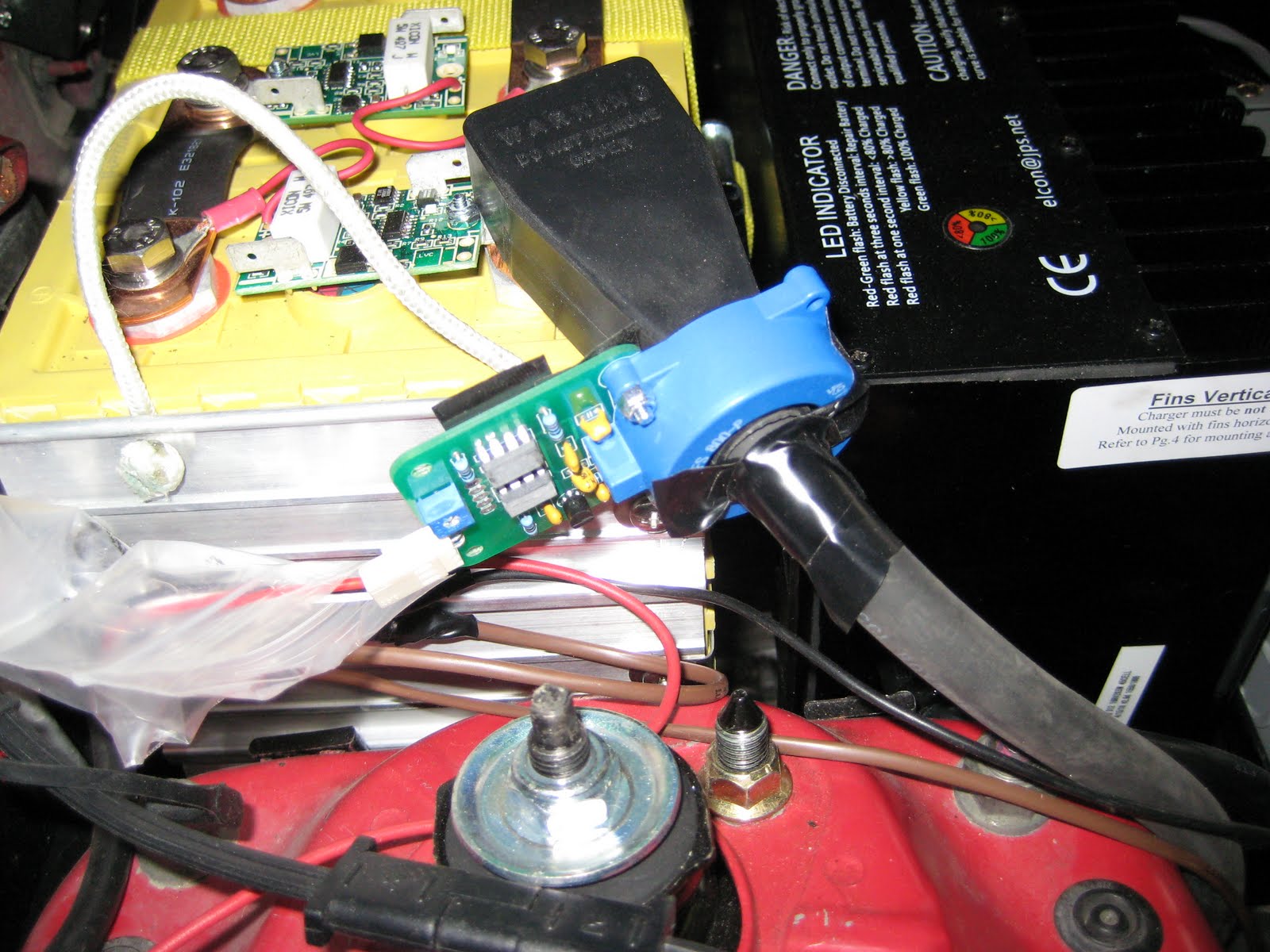
I'll have to drive it and tune it, but at least for now it says I have gas in the tank. :)

Monday, January 11, 2010
Bluetooth & test drive
We finally got some warmer weather, which motivated me to wire the IOGEAR Bluetooth adapter into the 5v output of the Kelly controller temporarily to allow the EV Dashboard to connect to the Paktrakr. I drove 10 miles and didn't find any EM interference from the engine or controller with the Bluetooth connection. The Kelly can only consistently put out a max of 120-130 amps but no more. The acceleration from the line was good, but not great. Also, at about 4500 RPM, in any gear the motor made a high pitched whine and reduced power. The SOC% went from 88% down to 52% for 10 miles.

One thing did suprise me, while accelerating, the LFP cells all dipped well into the "low" range below 2.75v (120v pack total). And they snapped back up to 3.2v (144v) when I let off the gas pedal. That's still a usable term isn't it? "gas pedal". This indicates that a low-voltage cut-off on the controller at anything above 2.75v would fail.

After adjusting the throttle and changing the Paktrakr amp sensor I drove it again, 10 miles. It topped out at 68 MPH and could sustain 140 amps. Better, but not the 250 amps in the Kelly specs, which I thought it could do.

After adjusting the throttle and changing the Paktrakr amp sensor I drove it again, 10 miles. It topped out at 68 MPH and could sustain 140 amps. Better, but not the 250 amps in the Kelly specs, which I thought it could do.
Wednesday, November 25, 2009
EV Dashboard
EV Dashboard is a Windows Mobile application that also runs on a Windows CE 5.0 based dash mounted GPS device like the one below.
This is a GPS touchscreen from dealextreme.com. Notice the catchy phrase on the side. It also says "Very Good Very Powerful" across the top.


After finding the time over a couple weeks to connect the Paktrakr up to the TS cells I was able to get the EV Dashboard connected. There were only a few differences between my test data and the live data from the Paktrakr so I only had a few tweaks to the display. I'll mount it in the car next.
It is pretty easy to see that cell 7 on Remote 4 is under charged. (I haven't activated the cells yet). There are 45 cells (20 in the trunk and 25 up front) and Remote 3 has only 5 cells on it and is split with 4 in the back and 1 under the hood. This required a single wire strung back to the remote in the trunk. Also, the remote's lead is not quite long enough so Ken Hall from Paktrakr is making an extension.
Here is the setup tab. You can select the battery type, select logging to the SD card and run back your data in simulation mode.

Contact me if you are interested in using the EV Dashboard. I'll can just send you the beta bits. Also let me know if you can build a low power bluetooth serial cable for the Paktrakr. That would save some power and $ for the IOGEAR Serial to Bluetooth adapter and DC adapter and it would be a more elegant solution. This previous post has some setup details.
This is a GPS touchscreen from dealextreme.com. Notice the catchy phrase on the side. It also says "Very Good Very Powerful" across the top.


After finding the time over a couple weeks to connect the Paktrakr up to the TS cells I was able to get the EV Dashboard connected. There were only a few differences between my test data and the live data from the Paktrakr so I only had a few tweaks to the display. I'll mount it in the car next.
It is pretty easy to see that cell 7 on Remote 4 is under charged. (I haven't activated the cells yet). There are 45 cells (20 in the trunk and 25 up front) and Remote 3 has only 5 cells on it and is split with 4 in the back and 1 under the hood. This required a single wire strung back to the remote in the trunk. Also, the remote's lead is not quite long enough so Ken Hall from Paktrakr is making an extension.
Here is the setup tab. You can select the battery type, select logging to the SD card and run back your data in simulation mode.

Contact me if you are interested in using the EV Dashboard. I'll can just send you the beta bits. Also let me know if you can build a low power bluetooth serial cable for the Paktrakr. That would save some power and $ for the IOGEAR Serial to Bluetooth adapter and DC adapter and it would be a more elegant solution. This previous post has some setup details.
Saturday, October 24, 2009
EV Dashboard
I've written a Windows CE app, which will also run on a Windows Mobile 5 and 6 device, to display data from the Paktrakr. It reads the data from a bluetooth adapter on the serial cable. I've got it running on a dashboard mounted GPS. On the main tab it displays amps, volts, temp, soc% and kWh. And on the second tab it has a bar chart of the batteries or cells with voltages. It has a simulation mode and can log data to the SD card.


Display:
I found a cheap 5" GPS display running Windows CE 5.0 Core with Bluetooth that can run apps. http://www.dealextreme.com/details.dx/sku.22067 It includes a bracket to mount on the dashboard.
The application should also run on any Windows CE 5.0 Core device with bluetooth including the Magellan Maestro 4250 and the Mio C520. These devices may, however, require renaming some of the installed files.
USB:
There is only one USB port on this type of device and it doesn't provide power. So it can't power a serial to USB adapter. Even more, because of limited battery on the device the USB is needed for charging. Perhaps there is a USB splitter that would charge from one side and communicate from the other, but I couldn't find one.
Bluetooth:
The device doesn't have pairing software for remote bluetooth devices so I had to discover devices and open a stream to the bluetooth device directly instead of through a virtual COM port. I used a IOGEAR Serial to Bluetooth adapter that has an AC power cable (output is 5V and .35A). To get it to work on the Paktrakr serial cable. Hopefully I can find a car adapter to fit it. Then I had to solder a wire between pin4 and pin7 on the 9pin serial cable coming from the paktrakr.
While this wasn't an ideal solution it does work.

Better Bluetooth Cable:
I ordered a couple bluetooth usb dongles from Amazon for 99 cents each. They run the Broadcom 2045 chipset which has very low power requirements. So, I believe it wouldn't be too hard or expensive to build a cable from Paktrakr. I'll be looking for some help with this since it is out of my comfort zone.
GPS:
Microsoft has a GPS Intermediate Driver (GPSID) that is available on Windows Mobile 5 and later. This allows multiple apps to share the GPS hardware. This GPS device doesn't ship with GPSID and I can't find a way to set it up. So, watthour/mile will have to wait for the "advanced" version.
Subscribe to:
Posts (Atom)


